Miller’s Law in Behavioural Web Design

- Published on
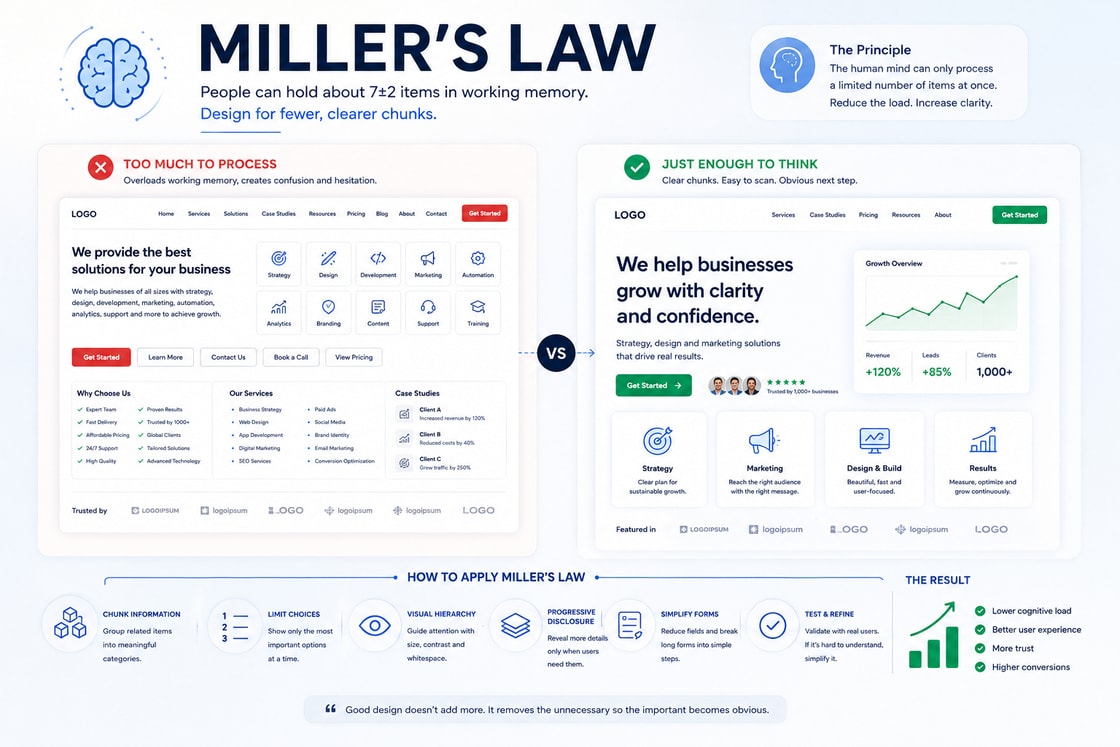
How Miller’s Law Shapes Web Design Decisions
Miller’s Law is one of the most useful psychology principles in behavioural web design. It explains why people can only hold a limited amount of information in working memory at one time. In practical website design, this means users should not be forced to process too many choices, messages, features, prices, form fields, or navigation paths at once.
A website may look modern, polished, and visually impressive, but if it asks the user to think too hard, it creates friction. Users do not always leave because they dislike the offer. Sometimes they leave because the page feels mentally expensive.
Miller’s Law helps designers, marketers, and business owners understand a simple truth: clarity converts better than overload.
The strongest websites do not show everything at once. They group information into meaningful chunks, reduce unnecessary choices, guide attention in stages, and make the next step easy to understand.
What Miller’s Law means
Miller’s Law is commonly associated with the idea that people can hold around seven items, give or take two, in working memory. In web design, the important lesson is not to treat seven as a strict design rule. The more useful lesson is that human attention is limited.
Users cannot process unlimited information at the same time.
They scan.
They group.
They simplify.
They ignore.
They choose the path that feels easiest to understand.
This is why chunking matters. Chunking means organising information into small, meaningful groups instead of presenting everything as one large block.
For example, a list of twenty service features feels difficult to process. The same features grouped into four categories can feel much easier.
A long form with twelve fields can feel intimidating. The same form divided into three clear steps can feel manageable.
A pricing page with too many plan details can confuse users. The same page with clear plan groups, short feature summaries, and comparison highlights can make the decision easier.
Miller’s Law is not about making a website simplistic. It is about making complexity easier to understand.
Business Psychology Principle
From a business psychology point of view, Miller’s Law is about reducing mental strain at the exact moment where the user is deciding whether to continue.
Every website visitor has a limited attention budget. If the page spends that budget on confusion, the user has less attention left for the offer, the proof, and the action.
This matters because business decisions are rarely made with pure logic. Even in B2B, users respond to how easy or difficult a page feels.
A page that feels easy to understand creates confidence.
A page that feels cluttered creates doubt.
A page that presents too many choices creates hesitation.
A page that breaks information into clear groups helps the user move forward.
In business psychology, Miller’s Law supports three major outcomes.
Lower cognitive load.
Faster decision making.
Higher confidence before conversion.
When users feel that a website is easy to process, they are more likely to trust the business behind it. Clarity becomes a commercial advantage.
Why Miller’s Law matters on a website
A website has a small window to help the user understand what is being offered and what they should do next.
Most visitors are not reading slowly from top to bottom. They are scanning the page while asking silent questions.
What does this company do?
Is this relevant to me?
Can I understand the offer quickly?
Is this worth more of my time?
What should I click next?
Is this too much effort?
Miller’s Law matters because every extra choice, message, link, animation, popup, or section can either help the user or increase mental load.
A website becomes harder to use when it presents too many things at the same level of importance.
Too many menu items.
Too many buttons.
Too many competing messages.
Too many pricing options.
Too many form fields.
Too many visual elements.
Too many claims without structure.
The issue is not always the amount of information. The real issue is how that information is organised.
How Miller’s Law shapes attention
Attention works better when information is grouped. Users can understand a section faster when it has a clear structure.
For example, a service page should not throw every benefit, process step, testimonial, result, and call to action into one continuous flow without rhythm. The page should break the journey into smaller mental units.
A strong page structure may look like this.
Main problem.
Clear promise.
Core benefits.
Process.
Proof.
Pricing or scope.
Frequently asked questions.
Call to action.
Each section gives the user one thing to understand before moving to the next.
This is how Miller’s Law helps web design. It does not remove important information. It controls the order in which information is processed.
Miller’s Law and conversion decisions
Conversion depends on confidence. A user is more likely to take action when the page reduces uncertainty and makes the next step feel manageable.
Miller’s Law helps conversion by reducing the number of things the user must compare at one time.
For example, a landing page with five different calls to action can make the user hesitate. A page with one clear primary action and one secondary action is easier to follow.
A pricing page with too many plans can delay the decision. A pricing page with three clear options and simple plan labels can feel easier to compare.
A service page with too many benefits listed at once can weaken the message. A page that groups benefits into outcomes, process, and proof can make the value easier to understand.
The user should never feel that they need to solve the website before they can buy from the business.
How Miller’s Law improves usability
Usability improves when users can understand the interface without holding too many details in memory.
This is especially important in:
Navigation menus.
Forms.
Pricing tables.
Product filters.
Booking flows.
Checkout pages.
Dashboards.
Service pages.
Comparison sections.
Frequently asked questions.
A usable website does not require users to remember information from five sections earlier. It gives them the right information at the right time.
For example, if a form asks for a phone number, explain why near the field. Do not explain it later.
If a pricing plan has limits, show the limits near the plan. Do not hide them in another section.
If a button says “Book a Call,” explain what happens after booking close to the button.
This reduces memory pressure and makes the interface feel easier.
How Miller’s Law builds trust
Trust is not only created by testimonials and logos. Trust is also created by clarity.
When a website is easy to understand, the business feels more competent. When a website feels cluttered, the business can feel less reliable, even if the offer is good.
Users often judge the quality of a business through the quality of the experience.
A clear website suggests organisation.
A focused website suggests confidence.
A simple user journey suggests respect for the visitor’s time.
A cluttered website suggests uncertainty.
This is why Miller’s Law is important for business positioning. The way information is grouped affects how professional the brand feels.
How to apply Miller’s Law in web design
The best way to apply Miller’s Law is to stop asking, “Can we add this?” and start asking, “Can the user process this easily?”
A website should not present every possible detail at once. It should reveal information in a helpful order.
1. Group related information
Do not present long lists without structure. Group related items into categories.
For example, instead of listing twelve features in one block, group them into:
Strategy.
Execution.
Reporting.
Support.
This helps users understand the value faster.
2. Limit primary choices
Every page should have a clear main action. Too many equal choices create hesitation.
A page can have secondary links, but the primary action should be obvious.
For example:
Book a Call.
View Case Studies.
The first action is the main conversion path. The second action supports users who need more proof.
3. Break long forms into steps
Long forms often feel more difficult than they really are. Breaking them into steps can reduce mental pressure.
A good form structure may be:
Basic details.
Project details.
Contact preference.
This makes the form feel easier because the user only has to focus on one group at a time.
4. Use progressive disclosure
Progressive disclosure means showing basic information first and revealing deeper details only when needed.
This works well for:
Frequently asked questions.
Pricing details.
Product specifications.
Technical content.
Advanced filters.
Terms and conditions.
Service scope.
This keeps the first view clean while still giving detailed users the information they need.
5. Make navigation simpler
Navigation should help users choose a path quickly. If the menu contains too many items, group them by intent.
For example:
Services.
Industries.
Case Studies.
Resources.
Contact.
Inside large menus, use clear categories instead of a long mixed list.
6. Make pricing easy to compare
Pricing pages are naturally high pressure. Users need to understand differences quickly.
A strong pricing section should keep each plan clear.
Plan name.
Best for.
Price.
Main benefits.
Key limits.
Call to action.
Reassurance.
Do not make users compare every tiny detail before they understand the main difference between plans.
7. Keep page sections focused
Each section should have one main purpose.
A section that tries to explain the problem, show testimonials, describe the process, compare pricing, and push a call to action at the same time will feel overloaded.
One section should do one job clearly.
Tips and Tricks
Use the rule of three for first impressions
When designing the first screen of a page, keep the main visible message focused around three things.
What the offer is.
Why it matters.
What to do next.
This helps users understand the page quickly.
Turn long lists into grouped cards
If a page has many benefits, do not show them as one large list. Turn them into grouped cards with short headings.
For example:
Save Time.
Reduce Risk.
Improve Visibility.
Increase Revenue.
Each card can contain two or three supporting points.
Use short section labels
Section labels help users understand where they are on the page.
Examples:
How It Works.
What You Get.
Why It Works.
Proof.
Pricing.
Questions.
These labels reduce interpretation and make scanning easier.
Reduce competing buttons
If every section has multiple buttons, users may not know which path matters.
Use one main button style for the primary action. Use a quieter style for secondary links.
Use accordions carefully
Accordions can help reduce visual overload, especially for frequently asked questions or detailed specifications.
However, do not hide essential buying information inside accordions. Important information should still be visible at the right decision point.
Keep forms visually calm
Forms should feel light and easy.
Use:
Clear field labels.
Short help text.
Logical field groups.
Visible progress.
Reassurance near the submit button.
Error messages beside the relevant field.
Make comparison easier
When users compare options, reduce the number of variables they must hold in memory.
Use:
Clear plan names.
Highlighted differences.
Recommended labels where useful.
Short summaries.
Simple feature grouping.
Avoid equal visual weight
Not every element deserves the same attention. If every card, button, heading, and icon competes equally, the user has to work harder.
Use hierarchy to show what matters most.
Repeat important context near actions
Do not make users remember earlier details before clicking.
Near a call to action, remind them:
What they get.
What happens next.
Why it is low risk.
How long it takes.
This supports action without adding pressure.
Test with a five second scan
Show the page to someone for five seconds and ask:
What is this page about?
What is the main offer?
What would you click next?
If they cannot answer, the page may be carrying too much cognitive load.
Practical examples
Hero section
A weak hero section tries to say too much.
It may include a long headline, two paragraphs, three buttons, logos, stats, badges, animations, and a form all in one view.
A stronger hero section uses Miller’s Law by focusing on a smaller set of cues.
Clear headline.
Short supporting line.
One primary button.
One trust signal.
One relevant visual.
This helps the user understand the offer before asking them to act.
Service page
A service page should not list every capability at once. It should organise the service into meaningful stages.
For example:
What problem we solve.
What we do.
How we do it.
What results look like.
Why clients trust us.
How to start.
This turns a complex service into a clear decision journey.
Pricing page
A pricing page should reduce comparison stress.
Instead of showing every feature in every plan immediately, start with a simple comparison.
Starter: best for small teams.
Growth: best for growing businesses.
Custom: best for complex needs.
Then allow users to explore detailed features below.
This helps users choose a direction before reviewing details.
Form design
A poor form asks for too much at once and gives no structure.
A better form uses steps.
Your details.
Your project.
Your preferred contact time.
This makes the form feel shorter because the user is not looking at every field at the same time.
Navigation
A weak navigation menu shows every page as a flat list.
A better navigation menu groups links by intent.
Services.
Industries.
Resources.
Results.
Contact.
This helps users find the right path without reading every link.
Common mistakes
Treating Miller’s Law as a strict number rule
The lesson is not that every menu must have exactly seven items. The real lesson is that working memory is limited. The goal is to reduce unnecessary mental effort.
Showing too many choices at once
More options do not always create more freedom. Sometimes they create delay.
If users cannot quickly understand the difference between options, they may avoid choosing altogether.
Making every detail visible immediately
Some details matter, but not all details matter at the same moment. Show the most useful information first and reveal deeper information when needed.
Using long blocks of copy without structure
Long copy can work well, but it needs headings, spacing, grouping, and rhythm. Otherwise, users may skip important information.
Overloading the hero section
The first screen should create clarity, not explain the entire business.
A strong hero gives users enough reason to continue. The rest of the page can build the full argument.
Hiding essential information
Reducing cognitive load does not mean hiding important details. It means placing details where they are most useful.
The user should not have to search for pricing limits, form expectations, delivery information, or process details.
How to use Miller’s Law ethically
Miller’s Law should be used to make websites easier and fairer for users. It should not be used to hide information, pressure decisions, or make options unclear.
Good use of Miller’s Law:
Helps users understand choices.
Reduces confusion.
Makes forms easier.
Makes pricing clearer.
Makes navigation predictable.
Supports informed decisions.
Bad use of Miller’s Law:
Hides important terms.
Removes useful comparison details.
Pushes users into one option without clarity.
Makes cancellation or support harder to find.
Uses simplicity to disguise risk.
Ethical behavioural design makes the right decision easier to understand, not harder to question.
How to audit a website using Miller’s Law
A Miller’s Law audit helps identify where a website is overloading the user.
Ask these questions page by page.
Is the main message clear within five seconds?
Are there too many choices in the first screen?
Are related items grouped together?
Are long lists broken into categories?
Does each section have one clear purpose?
Are forms divided into logical groups?
Is pricing easy to compare?
Are primary and secondary actions clearly different?
Does the navigation feel simple?
Is the mobile page still easy to scan?
Does the user need to remember too much from earlier sections?
Can important details be found at the moment they matter?
If the answer is unclear, the page may need better grouping, stronger hierarchy, or fewer simultaneous choices.
Practical takeaway
Miller’s Law shows that users have limited working memory. A website that ignores this limit can feel confusing, even when the offer is strong.
The goal is not to remove depth. The goal is to structure depth.
When information is grouped clearly, users understand faster. When choices are limited, users decide with more confidence. When forms are broken into steps, users feel less pressure. When pricing is easy to compare, users hesitate less.
The best websites do not make visitors hold everything in their head. They guide users through one clear decision at a time.
Before publishing an important page, ask three questions.
What is the user being asked to understand right now?
Can this information be grouped more clearly?
Is the next action obvious without extra thinking?
If the page feels mentally heavy, the design is asking the visitor to do too much work.
Design checklist
Keep each section focused on one main idea.
Group related information into clear chunks.
Limit the number of primary choices.
Use short headings to make scanning easier.
Break long forms into logical steps.
Use progressive disclosure for complex details.
Make pricing options easy to compare.
Keep navigation grouped by user intent.
Use one clear primary call to action.
Avoid showing every detail at the same time.
Make important information visible near the decision point.
Use consistent layouts across similar pages.
Test whether users can explain the page after a five second scan.
Remove visual elements that compete with the main decision.
Make the website feel easier to process, not just better to look at.
Miller’s Law is not just a psychology term. In behavioural web design, it becomes a practical lens for deciding what users notice, how they interpret a page, and whether they feel confident enough to continue. The strongest websites do not rely on visual polish alone. They use structure, sequencing, contrast, and context to make decision making feel natural.
What the principle means
At its core, miller’s law explains why people do not read and judge a page as a neutral machine would. They scan for patterns, compare what is near, familiar, prominent, or easy, and then decide whether the page deserves more attention. In web design, the principle matters because the interface is often judged before the offer is fully understood.
Why it matters on a website
A website has only a small window to make the next action feel clear. When miller’s law is respected, the page feels more coherent, less mentally expensive, and more trustworthy. When it is ignored, users may hesitate, miss the intended path, or assume the page is harder to use than it really is.
How to apply it
Use the principle to guide layout, hierarchy, copy order, button placement, form design, product comparison, and the rhythm of the page. The aim is not to manipulate the user. The aim is to remove unnecessary friction so the intended decision becomes easier to understand.
Common mistake
The common mistake is treating the principle as decoration rather than structure. A page can look polished and still create confusion if the visual relationships, content sequence, or decision cues are weak. Good behavioural design makes the correct next step feel obvious without making the page feel forced.
Practical takeaway
Before publishing a page, ask what the user will notice first, what they will compare next, and what confidence they need before taking action. If the answer is unclear, the design is asking the visitor to do too much cognitive work.
Design checklist
Make the first visible cue support the main purpose of the page.
Keep related content, proof, and calls to action close enough to feel connected.
Remove choices that compete with the user’s most likely next decision.
Use spacing, order, and contrast to reduce unnecessary interpretation.
Test the page by asking whether a new visitor can explain the next step in five seconds.