How Nudge Theory Shapes Web Design Decisions

- Published on
How Nudge Theory Shapes Web Design Decisions
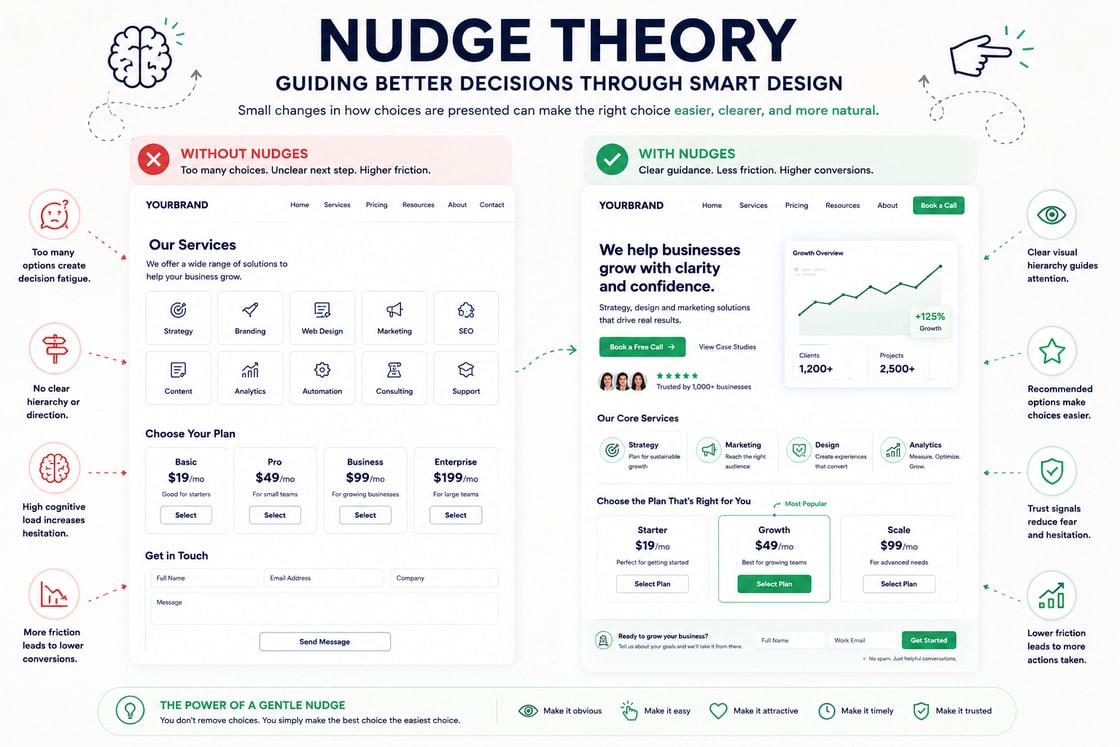
Nudge Theory is one of the most practical ideas in behavioural web design. It explains how small changes in the way choices are presented can influence what users notice, how they compare options, and whether they feel confident enough to take the next step.
A nudge does not force a decision. It gently shapes the decision environment so the better or more useful action becomes easier to understand.
On a website, this matters because users rarely make decisions in a perfectly calm and rational way. They scan quickly, avoid effort, respond to visual cues, look for reassurance, and choose the path that feels easiest to trust. The design can either support that process or make the user work harder than necessary.
Strong websites do not rely on visual polish alone. They use choice architecture, hierarchy, defaults, sequencing, reassurance, and friction control to make decision making feel natural.
Nudge Theory helps turn a website from a collection of sections into a guided decision journey.
What Nudge Theory means
Nudge Theory is based on the idea that people’s decisions are influenced by the way options are presented. The choice itself may remain open, but the surrounding context affects how easy, obvious, safe, or attractive each option feels.
In web design, a nudge can be a small design decision that helps the user move forward.
For example:
A clear primary button that makes the next step obvious.
A recommended pricing plan that helps users compare options.
A short reassurance line near a form button.
A progress indicator in a multi step form.
A default option that matches the most common user need.
A testimonial placed near a high friction decision point.
A reminder of what happens after clicking.
A clean form layout that reduces hesitation.
These are not random visual details. They are behavioural cues.
A good nudge reduces confusion. A bad nudge creates pressure. The difference matters.
Ethical nudging helps users make decisions they are already likely to value. Manipulative nudging tries to push users into choices that mainly benefit the business at the user’s expense.
Good behavioural web design should always respect the user.
Business Psychology Principle
From a business psychology point of view, Nudge Theory is about reducing decision friction while preserving user control.
Every website visitor arrives with some level of uncertainty. They may be unsure whether the offer is relevant, whether the company is credible, whether the price is fair, whether the process is simple, or whether clicking will create unwanted commitment.
A nudge helps answer these concerns at the right moment.
For a business, this is important because hesitation often happens before the user consciously rejects the offer. Many users do not think, “This product is not suitable.” They simply feel unsure, distracted, overloaded, or unconvinced.
The role of a good website is to make the next useful action easier to understand.
Nudge Theory supports business outcomes in four major ways.
It helps users notice the most important path.
It reduces unnecessary decision effort.
It increases confidence at moments of hesitation.
It makes conversion feel like a logical next step.
This does not mean the website should trick people. It means the website should remove avoidable friction.
A strong nudge helps the user think, “This makes sense. I know what to do next.”
Why Nudge Theory matters on a website
A website has a short window to create clarity. Users do not evaluate every message equally. They respond to the structure of the page.
What is bigger feels more important.
What is repeated feels more familiar.
What is placed first feels like a starting point.
What is recommended feels easier to choose.
What is close to proof feels more credible.
What is difficult to find feels less important.
This is why Nudge Theory matters. The interface is not neutral. Every layout decision guides behaviour in some way.
If the page has five competing buttons, the user may hesitate.
If the pricing section does not show a recommended option, the user may struggle to compare.
If the form does not explain what happens next, the user may avoid submitting.
If trust signals are placed far away from the action, the user may still feel uncertain.
If the page sequence does not match the user’s decision journey, the user may leave before understanding the offer.
Nudge Theory helps businesses design websites that guide without overwhelming.
How Nudge Theory shapes attention
Attention is limited. Users need clear signals that tell them what matters first, what matters next, and what can wait.
Nudges help shape attention through hierarchy.
For example, a landing page should not give equal weight to every message. The main value proposition should be visually stronger than secondary details. The primary action should stand out more than supporting links. Trust signals should appear near moments where the user is likely to hesitate.
A good attention nudge might include:
A clear hero headline.
One primary call to action.
A short explanation under the button.
A relevant trust signal close to the action.
A visual cue that supports the message.
This helps the user understand the page quickly.
The goal is not to make the page louder. The goal is to make the page easier to interpret.
How Nudge Theory improves usability
Usability improves when the website makes expected actions easy and confusing actions less likely.
Nudge Theory helps by reducing the number of decisions the user has to make at once.
For example, in a form, users may hesitate if they do not know which fields are required, why certain information is being requested, or how long the process will take. A simple progress indicator can reduce uncertainty. Clear labels can reduce mistakes. Inline help text can prevent confusion. A reassurance line near the submit button can reduce risk perception.
In navigation, users may hesitate if there are too many menu items. Grouping links by intent can nudge users towards the right path.
In pricing, users may struggle if every plan looks equally important. Highlighting the most suitable plan can help users compare faster.
In checkout, users may abandon if delivery, payment, or return information is unclear. Showing reassurance close to the purchase button can reduce doubt.
Good nudges make the interface easier to use without removing user choice.
How Nudge Theory affects conversion
Conversion is not only about persuasion. It is about confidence.
Before a user converts, they usually need to answer several silent questions.
Is this relevant to me?
Can I trust this business?
Do I understand what I am getting?
Is the next step clear?
Is there any risk?
Can I change my mind later?
What happens after I click?
Nudge Theory helps by placing the right cue near the right concern.
For example:
Near a form, add privacy reassurance.
Near pricing, add cancellation or support reassurance.
Near a booking button, explain what happens after booking.
Near a product claim, show proof.
Near a plan comparison, highlight the best fit.
Near checkout, show delivery and return details.
These small changes can make the action feel safer and more logical.
A conversion nudge works best when it supports the user’s existing intention. It should never feel like pressure.
Choice architecture in web design
Choice architecture means designing the way options are presented.
On a website, this includes:
Which options are shown first.
How many options are shown at once.
Which action is visually strongest.
Which option is recommended.
Which information is visible before action.
Which details are shown later.
Which path feels easiest to follow.
The user remains free to choose, but the design affects how easy each choice feels.
A strong choice architecture does not overload users. It organises decisions into a clear sequence.
For example, a service website may guide users like this:
Understand the problem.
See the outcome.
Review the process.
Check proof.
Compare options.
Take action.
This sequence nudges the user from awareness to confidence.
How to Apply Nudge Theory
1. Make the primary action obvious
Every important page should have one clear primary action. Users should not have to guess what the business wants them to do next.
Examples:
Book a Call.
Start Free Trial.
Get a Quote.
Download the Guide.
Request a Demo.
Secondary actions can exist, but they should not compete visually with the primary action.
2. Add reassurance near high friction points
Users hesitate when they feel risk. Place reassurance close to the moment where that risk appears.
For example:
Near forms: “We only use this to respond to your enquiry.”
Near checkout: “Secure payment and easy returns.”
Near booking: “No obligation. We will confirm the best next step.”
Near pricing: “Cancel anytime.”
Near downloads: “No spam. Just the guide.”
Reassurance should be specific. Generic trust copy is weaker.
3. Use defaults carefully
Defaults are powerful nudges because many users accept the option that is already selected. This is useful when the default genuinely helps the user.
For example:
Preselecting the most common appointment length.
Showing the most popular pricing plan first.
Setting the default billing option clearly.
Choosing a sensible filter based on user intent.
Defaults should be transparent. Users should understand what is selected and be able to change it easily.
4. Highlight recommended options
When users compare options, a recommendation can reduce decision fatigue.
For example:
“Best for growing teams.”
“Most popular.”
“Recommended for small businesses.”
“Best value.”
“For advanced needs.”
The recommendation should be honest and useful. If everything is marked as recommended, the nudge loses value.
5. Break decisions into steps
Large decisions feel easier when they are broken into smaller steps.
This is useful for:
Quote forms.
Booking flows.
Product customisation.
Checkout.
Account creation.
Service enquiries.
Instead of showing every field at once, guide users through a clear process.
A simple structure might be:
Your details.
Your requirements.
Preferred contact method.
Review and submit.
This reduces mental load.
6. Use social proof at the right moment
Social proof is a strong nudge when placed close to uncertainty.
Examples:
Client logos near the first call to action.
Testimonials near a service claim.
Reviews near product details.
Case study results near performance promises.
Usage numbers near signup actions.
Social proof should support the specific claim being made. Random proof is weaker than relevant proof.
7. Make progress visible
Progress indicators help users feel in control.
This works especially well for forms, onboarding, checkout, and booking flows.
Examples:
Step 1 of 3.
Almost done.
Review your details.
Final step.
Progress nudges users to continue because the process feels finite.
8. Reduce competing choices
Too many options can delay action.
A page with many equal buttons creates uncertainty. A form with too many fields creates resistance. A navigation menu with too many links creates decision fatigue.
Reduce competing choices by:
Grouping related options.
Making the main action visually clear.
Moving secondary details lower on the page.
Using progressive disclosure.
Removing links that do not support the page goal.
Tips and Tricks
Use one strong call to action per section
A section should usually guide the user towards one clear next step. Multiple equal actions can weaken the decision.
Place proof close to the claim
If you claim faster delivery, show delivery proof nearby. If you claim better results, show a result nearby. If you claim expertise, show relevant credentials nearby.
Explain what happens next
Many users avoid clicking because they do not know what the click means.
For example:
“Book a call” can be supported by “Choose a time and we will discuss your goals.”
“Request a quote” can be supported by “We will reply within one working day.”
“Download guide” can be supported by “Get the PDF instantly.”
This reduces uncertainty.
Use visual emphasis with restraint
A nudge should guide attention, not fight for attention. If every badge, button, icon, and heading is loud, nothing feels important.
Use labels that reduce effort
Instead of vague labels, use labels that help users choose.
Better labels include:
Best for startups.
Best for growing teams.
Best for enterprise teams.
Quick enquiry.
Detailed project request.
Specific labels reduce decision effort.
Use friction where it protects the user
Not all friction is bad. Some decisions should not be too easy.
For example:
Deleting an account.
Making a high value purchase.
Submitting sensitive information.
Agreeing to important terms.
Cancelling a service.
Ethical design uses friction where users need protection and removes friction where users need clarity.
Avoid fake urgency
Countdown timers, low stock warnings, and limited offer messages can be nudges, but they become manipulative if they are not true.
False urgency damages trust.
Test small nudges one at a time
Do not change everything at once. Test one behavioural cue at a time so you can understand what actually improves performance.
Examples:
Button copy.
Form reassurance.
Recommended plan label.
Trust signal placement.
Progress indicator.
Pricing order.
Practical examples
Hero section
A hero section can use Nudge Theory by making the main action clear and low risk.
A strong hero might include:
A specific headline.
A short explanation.
One primary call to action.
One secondary proof based link.
A trust signal near the button.
A short line explaining what happens next.
This nudges the user towards the main path without removing choice.
Pricing section
Pricing is a high friction area. Users need help comparing options.
A pricing section can use nudges by:
Highlighting the most relevant plan.
Labelling who each plan is for.
Showing the most important differences first.
Placing reassurance near the payment action.
Keeping detailed feature comparisons lower on the page.
This makes the choice easier without hiding information.
Form design
Forms can use nudges by reducing uncertainty.
Helpful nudges include:
Progress indicators.
Clear field groups.
Required field labels.
Privacy reassurance.
Helpful error messages.
A clear submit button.
A short success message after completion.
The form should feel manageable before the user starts.
Ecommerce checkout
Checkout pages need trust nudges.
Useful cues include:
Secure payment signals.
Delivery estimate near the total.
Return policy near the purchase button.
Order summary that stays visible.
Clear payment options.
No surprise costs.
These nudges reduce abandonment because users feel more informed.
Service pages
Service pages can use nudges by guiding users from problem to action.
A strong sequence might be:
Problem.
Outcome.
Process.
Proof.
Frequently asked questions.
Call to action.
This supports the user’s decision journey rather than rushing the sale.
Common mistakes
Treating nudges as tricks
Nudges should not be used to mislead users. If the design makes users act against their own interest, it is not good behavioural design.
Adding too many nudges
Too many badges, labels, prompts, sticky bars, popups, and urgency messages can make a page feel desperate.
A nudge should reduce effort, not create noise.
Using fake scarcity
False scarcity may increase short term clicks, but it harms long term trust.
Hiding important information
Do not use simplicity as an excuse to hide pricing, terms, limits, or cancellation details. Users should be able to make informed decisions.
Making every option look recommended
If every option is highlighted, users still have to do the comparison themselves.
Interrupting too early
Popups and prompts should appear at useful moments. Showing them before the user understands the page often creates irritation.
How to use Nudge Theory ethically
Ethical nudging respects user choice. It makes helpful decisions easier without removing transparency.
Good nudges:
Clarify choices.
Reduce confusion.
Support user goals.
Make risks clear.
Explain what happens next.
Allow users to change their mind.
Keep important information visible.
Bad nudges:
Hide costs.
Use fake urgency.
Make cancellation difficult.
Pressure users with guilt.
Preselect options that mainly benefit the business.
Make refusal harder than acceptance.
The best nudges help both the business and the user. They guide decisions without exploiting attention.
How to audit a website using Nudge Theory
A Nudge Theory audit helps identify where users may need clearer cues, better sequencing, or less friction.
Ask these questions page by page:
What is the main action users should take?
Is that action visually obvious?
Is there enough context before the action?
What might make users hesitate?
Is reassurance placed near that hesitation?
Are there too many competing choices?
Are recommendations useful and honest?
Are defaults transparent?
Does the page explain what happens after clicking?
Are important risks or terms visible?
Are forms broken into manageable steps?
Does the mobile version preserve the same decision path?
If users must guess what to do next, the page needs stronger choice architecture.
Practical takeaway
Nudge Theory shows that small design choices can have a large effect on user behaviour. Button placement, wording, defaults, proof, reassurance, section order, and visual hierarchy all shape the way users make decisions.
A good nudge does not force action. It makes the next useful action easier to understand.
The best websites use nudges to reduce uncertainty, guide attention, and support informed decisions. They do not pressure users. They help users move forward with confidence.
Before publishing an important page, ask three questions:
What decision is the user making here?
What hesitation might stop them?
What small cue would make the next step clearer?
If the answer is unclear, the website may not need more decoration. It may need better behavioural guidance.
Design checklist
Make the primary action clear on every important page.
Use one strong call to action per section.
Place reassurance near high friction actions.
Explain what happens after users click.
Use defaults only when they genuinely help users.
Highlight recommended options honestly.
Break complex decisions into smaller steps.
Use progress indicators for multi step flows.
Place proof close to the claim it supports.
Reduce competing choices.
Avoid fake urgency and false scarcity.
Keep important terms, costs, and limits visible.
Use friction where it protects the user.
Test behavioural cues one at a time.
Make nudges support clarity, not pressure.
Nudge Theory is not just a psychology term. In behavioural web design, it becomes a practical lens for deciding what users notice, how they interpret a page, and whether they feel confident enough to continue. The strongest websites do not rely on visual polish alone. They use structure, sequencing, contrast, and context to make decision making feel natural.
What the principle means
At its core, nudge theory explains why people do not read and judge a page as a neutral machine would. They scan for patterns, compare what is near, familiar, prominent, or easy, and then decide whether the page deserves more attention. In web design, the principle matters because the interface is often judged before the offer is fully understood.
Why it matters on a website
A website has only a small window to make the next action feel clear. When nudge theory is respected, the page feels more coherent, less mentally expensive, and more trustworthy. When it is ignored, users may hesitate, miss the intended path, or assume the page is harder to use than it really is.
How to apply it
Use the principle to guide layout, hierarchy, copy order, button placement, form design, product comparison, and the rhythm of the page. The aim is not to manipulate the user. The aim is to remove unnecessary friction so the intended decision becomes easier to understand.
Common mistake
The common mistake is treating the principle as decoration rather than structure. A page can look polished and still create confusion if the visual relationships, content sequence, or decision cues are weak. Good behavioural design makes the correct next step feel obvious without making the page feel forced.
Practical takeaway
Before publishing a page, ask what the user will notice first, what they will compare next, and what confidence they need before taking action. If the answer is unclear, the design is asking the visitor to do too much cognitive work.
Design checklist
Make the first visible cue support the main purpose of the page.
Keep related content, proof, and calls to action close enough to feel connected.
Remove choices that compete with the user’s most likely next decision.
Use spacing, order, and contrast to reduce unnecessary interpretation.
Test the page by asking whether a new visitor can explain the next step in five seconds.