How Primacy Effect Shapes Web Design Decisions

- Published on
How Primacy Effect Shapes Web Design Decisions
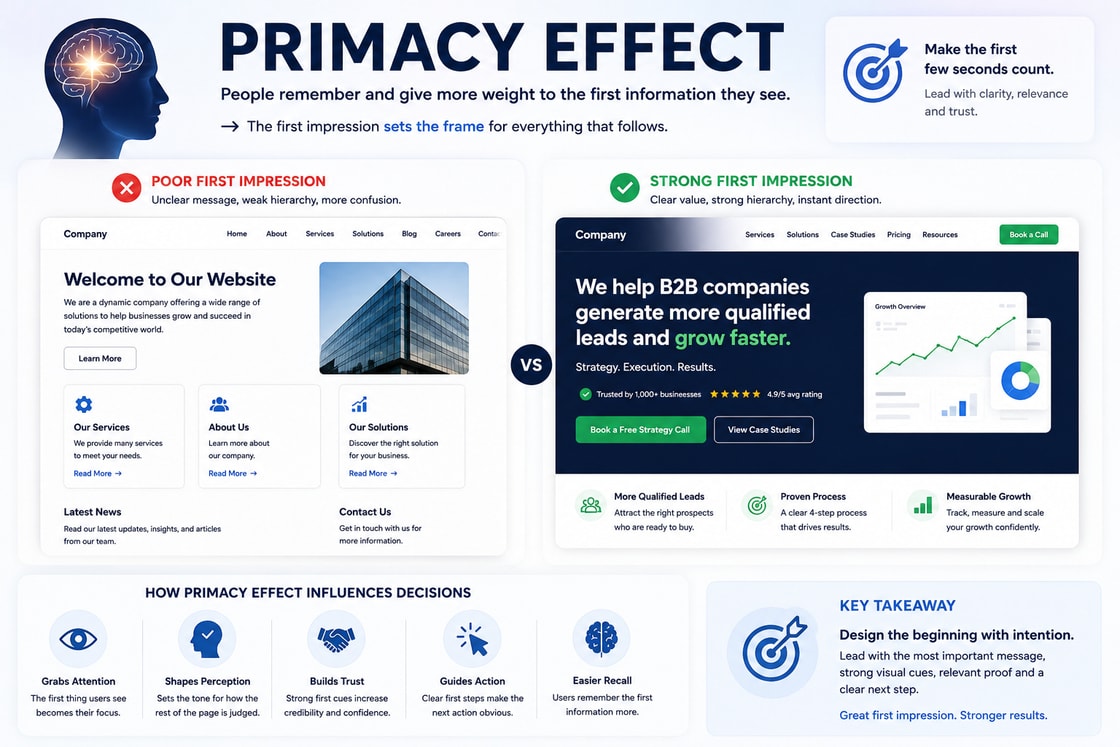
Primacy Effect is one of the most important psychology principles in behavioural web design. It explains why people give extra weight to the first information they see, hear, or experience.
On a website, this matters immediately.
The first headline, the first visual, the first sentence, the first button, the first proof signal, and the first visible layout pattern can shape how users interpret everything that follows. A visitor may continue scrolling, but their judgement has already started forming in the first few seconds.
This is why the opening experience of a website carries so much responsibility. It does not simply introduce the page. It frames the business.
A weak first impression can make a strong offer feel unclear. A confusing hero section can make a trustworthy company feel uncertain. A poor first visual can make a professional service feel less credible. A vague headline can make users work harder than they should.
Primacy Effect helps businesses understand that the first visible cues are not decoration. They are behavioural anchors.
The strongest websites use the beginning of the page to create clarity, relevance, trust, and direction. They do not wait too long to explain the value. They do not hide the main promise. They do not make users decode what the business does. They use the first few seconds carefully because those seconds influence the rest of the decision journey.
What Primacy Effect means
Primacy Effect describes the tendency for people to remember and give more importance to information that appears first in a sequence.
When users see information in order, the first item often becomes the reference point. It shapes expectations and affects how later information is interpreted.
In web design, this means the first visible experience matters because it creates the mental frame for the rest of the page.
For example:
If the first headline is clear, users are more likely to understand later sections.
If the first visual feels professional, users are more likely to trust the brand.
If the first call to action feels relevant, users are more likely to consider taking action later.
If the first proof signal is strong, later claims feel more credible.
If the first section feels cluttered, the entire website may feel harder to use.
The principle does not mean users ignore everything after the first section. It means the first section influences how the rest of the page is judged.
The first impression becomes the lens.
Business Psychology Principle
From a business psychology point of view, Primacy Effect is about the power of first impressions in commercial decision making.
Users do not arrive on a website as neutral judges. They bring expectations, doubts, limited attention, and a desire to quickly decide whether the page deserves more time.
The first few seconds help them answer silent questions.
What is this business?
Is this relevant to me?
Does it feel credible?
Does it look professional?
Do I understand the value?
Is this worth my attention?
What should I do next?
If the first experience answers these questions well, users are more likely to continue. If the first experience is vague or overloaded, users may leave before the business has a chance to explain itself.
This is why Primacy Effect matters for business performance. The opening screen can increase or reduce trust before the user has read the full page.
A strong first impression supports three commercial outcomes.
Faster understanding.
Higher perceived credibility.
Greater confidence to continue.
A weak first impression creates the opposite. It increases cognitive load, weakens trust, and makes users more likely to compare the business unfavourably.
In business psychology, the first impression is not just aesthetic. It is a conversion asset.
Why Primacy Effect matters on a website
A website has a short window to prove that it is worth the user’s attention. Most visitors do not start with deep commitment. They scan quickly and decide whether the page feels useful.
Primacy Effect matters because users often form an initial judgement before they fully understand the offer.
This judgement may be based on:
The headline.
The visual style.
The amount of clutter.
The perceived quality of the design.
The first visible proof.
The first call to action.
The first navigation choices.
The first few words of copy.
If these cues are aligned, the website feels coherent. If they conflict, the user feels uncertainty.
For example, a premium consultancy cannot afford a weak first impression. If the hero section feels generic, the visitor may assume the service is generic too.
A SaaS product cannot afford a confusing first screen. If the user cannot understand the product quickly, they may assume the product itself is difficult.
An ecommerce website cannot afford weak first visual trust. If the first product section looks poorly structured, users may question quality, delivery, or support.
Primacy Effect turns the beginning of the page into a strategic decision point.
How Primacy Effect shapes attention
Users usually notice the largest, clearest, and most immediate elements first. Those elements become the starting point for interpretation.
A strong page should make the first visible cue support the main purpose of the page.
This means the opening section should clearly answer:
What is being offered?
Who is it for?
Why does it matter?
What should the user do next?
Why should the user trust it?
If the first screen introduces too many ideas at once, attention becomes scattered. If it introduces the wrong idea first, users may misunderstand the offer.
For example, if a service page opens with a clever slogan but does not explain the actual service, users may feel lost. If a product page opens with a lifestyle image but hides the product benefit, users may not understand why they should continue. If a landing page opens with three equal buttons, users may hesitate instead of acting.
Primacy Effect suggests that the first screen should not try to do everything. It should do the most important thing clearly.
How Primacy Effect builds trust
Trust starts before users read testimonials or case studies. It begins with the first impression.
A website that looks clear, organised, and relevant creates a different emotional response from a website that looks vague, busy, or inconsistent.
The first impression can signal:
Professionalism.
Authority.
Relevance.
Stability.
Care.
Competence.
Credibility.
This does not mean a website needs to look expensive. It means the first experience should feel intentional.
A trust building opening section often includes:
A clear value proposition.
A professional visual system.
A specific audience or use case.
A relevant proof signal.
A confident call to action.
A short reassurance line.
For example, a line such as “Trusted by 1,000 businesses” is more powerful when it appears early and supports the main claim. A testimonial can also work early if it directly validates the promise.
The user should not have to scroll far to find a reason to believe the page.
How Primacy Effect affects conversion
Conversion depends heavily on the user’s initial frame of mind. If the first impression creates clarity and confidence, later calls to action feel more natural. If the first impression creates confusion, later conversion prompts have to work harder.
A user who understands the offer from the first screen is more likely to engage with the rest of the page.
A user who trusts the design from the start is more likely to believe later proof.
A user who sees a relevant action early is more likely to recognise the same action later.
This is why the first call to action matters. It sets the behavioural direction.
For example, if the main goal is to book a call, the first call to action should prepare users for that path. If the main goal is to download a guide, the opening section should make the guide’s value clear. If the main goal is to buy a product, the first screen should reduce uncertainty around product value and trust.
The opening section should not only attract attention. It should prepare the user for the decision journey.
Primacy Effect and the hero section
The hero section is one of the strongest applications of Primacy Effect. It is often the first meaningful section users see, especially on landing pages, service pages, and homepages.
A strong hero section should quickly communicate:
The main outcome.
The target audience.
The reason to care.
The main next step.
The first trust signal.
A weak hero section often includes:
A vague slogan.
A decorative visual that does not support the message.
Too many calls to action.
No immediate proof.
Too much copy.
No clear audience.
No explanation of what happens next.
The hero section should not be treated as a banner. It is the first behavioural frame.
A good hero section helps the user think, “I understand this. It is relevant. I know what to do next.”
Primacy Effect and page sequencing
Primacy Effect does not only apply to the first screen. It also applies to the first item in any sequence.
This matters in:
Pricing tables.
Feature lists.
Navigation menus.
Product grids.
Testimonials.
Case studies.
Form steps.
Service comparisons.
Blog introductions.
Frequently asked questions.
The first item in a sequence can influence how users judge the rest.
For example, the first pricing plan can affect how users compare value. The first feature can shape what users think the product is mainly about. The first testimonial can set the credibility tone. The first navigation item can suggest what the business considers most important.
This is why order matters.
Do not place items randomly. Put the most strategically useful information first.
Primacy Effect in pricing design
Pricing sections are heavily influenced by order. Users often use the first visible price or plan as a comparison anchor.
If the first plan feels too limited, users may judge the rest of the pricing through a low value frame. If the first plan feels too expensive, users may feel resistance before seeing the full value.
A strong pricing layout should use order carefully.
For example:
Place the most common plan in a prominent position.
Label plans by customer fit.
Make the first comparison easy to understand.
Put the most important differences near the top.
Avoid overwhelming users with detailed feature lists too early.
The first pricing impression should help users understand value, not force them into confusion.
Primacy Effect in navigation
Navigation is one of the first places users look when they want to understand a website. The order of navigation items can shape how users perceive the business.
A clear navigation structure tells users what the business values and where they should go.
For example, a B2B service website might prioritise:
Services.
Industries.
Case Studies.
Resources.
Contact.
This order makes sense because users first need to understand what is offered, then whether it applies to their industry, then whether there is proof, then how to learn more or take action.
If the navigation starts with less important or unclear items, users may struggle to form a quick mental model of the website.
Primacy Effect in forms
Forms also have a first impression. If the first step feels difficult, users may assume the whole form will be difficult.
A strong form should start with low friction fields before asking for more sensitive or detailed information.
For example, a multi step form might begin with:
Name.
Email.
Company.
Then move into:
Project details.
Budget.
Timeline.
Requirements.
This order feels easier because the user starts with simple information. The form builds commitment gradually.
The first form field should not create unnecessary hesitation. Asking for sensitive information too early can reduce completion.
Primacy Effect in content and copy
The first line of copy is often more important than later paragraphs. Users decide very quickly whether the content feels useful.
A strong opening should avoid vague generalities and get to the point.
Weak opening:
“Every business today needs a strong digital presence.”
Strong opening:
“Most users decide whether to trust a website before they understand the full offer.”
The second version creates a sharper frame. It immediately tells the reader why the topic matters.
In blog articles, service pages, and landing pages, the opening should give the user a reason to continue. It should not waste the first few seconds on generic setup.
How to Apply Primacy Effect
1. Lead with the clearest value
The first visible message should explain the value of the page. Avoid clever lines that need explanation.
A strong first message usually answers:
What do you do?
Who is it for?
What outcome does it create?
2. Put the strongest proof early
Do not hide proof at the bottom of the page. Place a relevant trust signal near the first major claim.
Useful early proof includes:
Client logos.
Review ratings.
Case study results.
Years of experience.
Recognised partners.
Media mentions.
Security or compliance signals.
3. Make the first call to action match the page goal
The first call to action should reflect the main business objective.
If the goal is to generate leads, make the action clear. If the goal is to sell, make the buying path clear. If the goal is education, make the next learning step clear.
Avoid mixing too many intentions in the first screen.
4. Order lists by importance
The first item in a list receives more attention. Put the most important benefit, feature, or proof point first.
Do not bury the strongest point in the middle.
5. Start forms with easy fields
Reduce hesitation by starting forms with simple fields. Ask for more detailed information only after the user has started.
The first step should create momentum.
6. Use the opening visual strategically
The first visual should support the message. A decorative visual may look good, but if it does not explain or reinforce the offer, it wastes attention.
Use visuals that show:
Product value.
Service outcome.
Customer use case.
Process clarity.
Result or transformation.
7. Keep the first screen focused
Do not overload the first screen with too many claims, buttons, badges, animations, and links.
The first screen should create clarity, not noise.
Tips and Tricks
Use a five second first impression test
Show the page to someone for five seconds and ask:
What does this business do?
Who is it for?
What would you click next?
If they cannot answer, the first impression is not doing enough.
Put the strongest benefit first
When listing benefits, start with the one that matters most to the user. Do not lead with a minor feature.
The first benefit should frame the value.
Use proof before pressure
Do not push users to act before they understand why they should trust the page.
Place proof early enough that the first call to action feels reasonable.
Avoid generic hero copy
Generic copy weakens Primacy Effect because the first impression becomes forgettable.
Avoid lines such as:
We help businesses grow.
Your trusted partner.
Solutions for every need.
Innovation for tomorrow.
These can work only if supported by specific context. Specificity creates a stronger first impression.
Use the first testimonial carefully
The first testimonial should support the main claim. Do not choose a vague testimonial just because it sounds positive.
A strong first testimonial mentions a clear result, concern, or outcome.
Place the most important FAQ first
Frequently asked questions are also affected by order. Put the question that handles the biggest hesitation first.
For example:
How much does it cost?
How long does it take?
What happens after I enquire?
Can I cancel?
Is support included?
The order should match user concern.
Make mobile first impressions strong
On mobile, the first screen is even smaller. The opening message, button, and proof need to be carefully prioritised.
Do not let a large image push the value proposition too far down. Do not let navigation or popups dominate the first impression.
Repeat the first promise later
The first promise should not disappear. Reinforce it through proof, process, examples, and calls to action.
This keeps the page coherent.
Practical examples
Service page
A service page can use Primacy Effect by opening with the clearest outcome.
Instead of leading with:
“We offer professional digital services for modern brands.”
Use a more specific opening:
“SEO strategy for B2B companies that need qualified organic leads, not just traffic.”
This gives users a stronger frame. The rest of the page can then support the promise with process, proof, and examples.
SaaS landing page
A SaaS page should make the product value clear before listing features.
Strong order:
Main product outcome.
Target user.
Visual product preview.
Primary call to action.
Trust signal.
Feature explanation.
Weak order:
Abstract slogan.
Animation.
Multiple buttons.
Generic feature icons.
Product explanation lower down.
The first version helps users understand faster.
Ecommerce page
An ecommerce page should make the first product impression strong.
Important early cues include:
Product image quality.
Product name.
Price.
Review rating.
Delivery or return reassurance.
Primary purchase action.
If these are unclear or scattered, the user may question the product before reading more details.
Pricing page
A pricing page should help users understand the main options quickly.
Strong first impression:
Clear plan names.
Customer fit labels.
Main price.
Key difference.
Recommended plan.
Reassurance.
Weak first impression:
Too many plans.
Equal visual weight.
Long feature tables first.
No recommendation.
Hidden limits.
Pricing should feel easy to compare from the start.
Blog article
A blog article should open with the most useful idea, not generic background.
A strong introduction tells the reader why the topic matters and what they will understand by continuing.
The first paragraph should create relevance. The first section should deepen understanding. The first example should make the concept practical.
Common mistakes
Wasting the first screen
Many websites use the opening screen for vague branding instead of clear value. This makes users work harder.
The first screen should not be treated as a decorative banner.
Leading with the weakest benefit
If the first benefit is not compelling, users may assume the rest of the offer is also weak.
Put the strongest user relevant benefit first.
Hiding proof too low
If users need trust before continuing, proof should appear early. Do not make them scroll far to find credibility.
Starting forms with difficult questions
Asking for budget, phone number, or detailed requirements too early can create resistance.
Start with easier fields where possible.
Giving equal weight to everything
If everything is visually important, nothing is truly important.
The first impression should guide attention.
Using clever copy before clear copy
Clever headlines can work only when the meaning is still obvious. If users have to decode the message, the page loses momentum.
Ignoring mobile order
Desktop sections often break on mobile. If the mobile order shows the wrong element first, the Primacy Effect can work against the page.
Mobile order must be checked carefully.
How to use Primacy Effect ethically
Primacy Effect should be used to create clarity, not to mislead users.
Good use of Primacy Effect:
Lead with the most relevant value.
Show real proof early.
Make the next step clear.
Prioritise helpful information.
Reduce confusion.
Set honest expectations.
Bad use of Primacy Effect:
Lead with exaggerated claims.
Hide important limitations.
Use misleading first impressions.
Place weak offers behind strong visual tricks.
Push users before giving enough context.
The first impression should help users make a better decision, not manipulate them into a rushed one.
How to audit a website using Primacy Effect
A Primacy Effect audit helps identify whether the first impression is helping or hurting the website.
Review each important page and ask:
What does the user see first?
Does the first message explain the page clearly?
Is the first visual relevant or decorative?
Is the first call to action aligned with the page goal?
Is there proof near the first major claim?
Does the first section reduce or increase uncertainty?
Is the strongest benefit visible early?
Are lists ordered by importance?
Does the mobile version show the right information first?
Can a new visitor explain the page after five seconds?
If the first impression is weak, later sections have to work much harder.
Practical takeaway
Primacy Effect shows that the beginning of a website matters more than many teams realise. Users form impressions quickly, and those impressions shape how they interpret the rest of the page.
The first headline frames the offer.
The first visual frames quality.
The first proof signal frames trust.
The first button frames the next step.
The first section frames the whole decision journey.
A strong website uses the opening experience carefully. It leads with clarity, supports the first claim with proof, makes the next action obvious, and avoids wasting attention on vague or decorative elements.
Before publishing an important page, ask three questions:
What is the first thing the user will understand?
Does that first impression support the business goal?
What belief do we want the user to carry into the rest of the page?
If the answer is unclear, the page may not need more content. It may need a stronger beginning.
Design checklist
Make the first visible message clear and specific.
Put the strongest user relevant benefit early.
Use the first visual to support the offer.
Place proof near the first major claim.
Make the first call to action match the page goal.
Avoid overloading the opening screen.
Order lists by importance.
Put the strongest testimonial first.
Start forms with easier fields.
Keep mobile first impressions clean and clear.
Make navigation order reflect user priorities.
Use pricing order carefully.
Avoid vague hero copy.
Test the page with a five second scan.
Make the beginning of the page frame the decision you want users to understand.
Primacy Effect is not just a psychology term. In behavioural web design, it becomes a practical lens for deciding what users notice, how they interpret a page, and whether they feel confident enough to continue. The strongest websites do not rely on visual polish alone. They use structure, sequencing, contrast, and context to make decision making feel natural.
What the principle means
At its core, primacy effect explains why people do not read and judge a page as a neutral machine would. They scan for patterns, compare what is near, familiar, prominent, or easy, and then decide whether the page deserves more attention. In web design, the principle matters because the interface is often judged before the offer is fully understood.
Why it matters on a website
A website has only a small window to make the next action feel clear. When primacy effect is respected, the page feels more coherent, less mentally expensive, and more trustworthy. When it is ignored, users may hesitate, miss the intended path, or assume the page is harder to use than it really is.
How to apply it
Use the principle to guide layout, hierarchy, copy order, button placement, form design, product comparison, and the rhythm of the page. The aim is not to manipulate the user. The aim is to remove unnecessary friction so the intended decision becomes easier to understand.
Common mistake
The common mistake is treating the principle as decoration rather than structure. A page can look polished and still create confusion if the visual relationships, content sequence, or decision cues are weak. Good behavioural design makes the correct next step feel obvious without making the page feel forced.
Practical takeaway
Before publishing a page, ask what the user will notice first, what they will compare next, and what confidence they need before taking action. If the answer is unclear, the design is asking the visitor to do too much cognitive work.
Design checklist
Make the first visible cue support the main purpose of the page.
Keep related content, proof, and calls to action close enough to feel connected.
Remove choices that compete with the user’s most likely next decision.
Use spacing, order, and contrast to reduce unnecessary interpretation.
Test the page by asking whether a new visitor can explain the next step in five seconds.