How Processing Fluency Shapes Web Design Decisions

- Published on
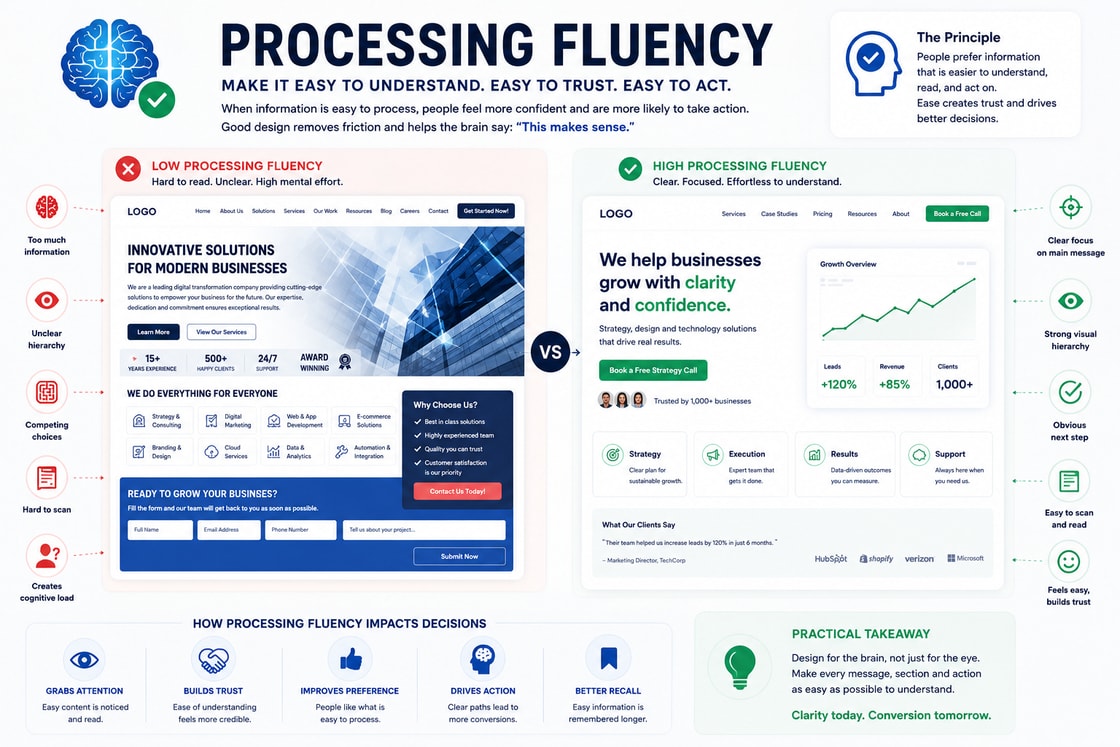
Processing Fluency
Processing Fluency is not just a psychology term. In behavioural web design, it becomes a practical lens for deciding what users notice, how they interpret a page, and whether they feel confident enough to continue. The strongest websites do not rely on visual polish alone. They use structure, sequencing, contrast, and context to make decision making feel natural.
What the principle means
At its core, processing fluency explains why people do not read and judge a page as a neutral machine would. They scan for patterns, compare what is near, familiar, prominent, or easy, and then decide whether the page deserves more attention. In web design, the principle matters because the interface is often judged before the offer is fully understood.
Why it matters on a website
A website has only a small window to make the next action feel clear. When processing fluency is respected, the page feels more coherent, less mentally expensive, and more trustworthy. When it is ignored, users may hesitate, miss the intended path, or assume the page is harder to use than it really is.
How to apply it
Use the principle to guide layout, hierarchy, copy order, button placement, form design, product comparison, and the rhythm of the page. The aim is not to manipulate the user. The aim is to remove unnecessary friction so the intended decision becomes easier to understand.
Common mistake
The common mistake is treating the principle as decoration rather than structure. A page can look polished and still create confusion if the visual relationships, content sequence, or decision cues are weak. Good behavioural design makes the correct next step feel obvious without making the page feel forced.
Practical takeaway
Before publishing a page, ask what the user will notice first, what they will compare next, and what confidence they need before taking action. If the answer is unclear, the design is asking the visitor to do too much cognitive work.
Design checklist
Make the first visible cue support the main purpose of the page.
Keep related content, proof, and calls to action close enough to feel connected.
Remove choices that compete with the user’s most likely next decision.
Use spacing, order, and contrast to reduce unnecessary interpretation.
Test the page by asking whether a new visitor can explain the next step in five seconds.