How Progressive Disclosure Shapes Web Design Decisions

- Published on
How Progressive Disclosure Shapes Web Design Decisions
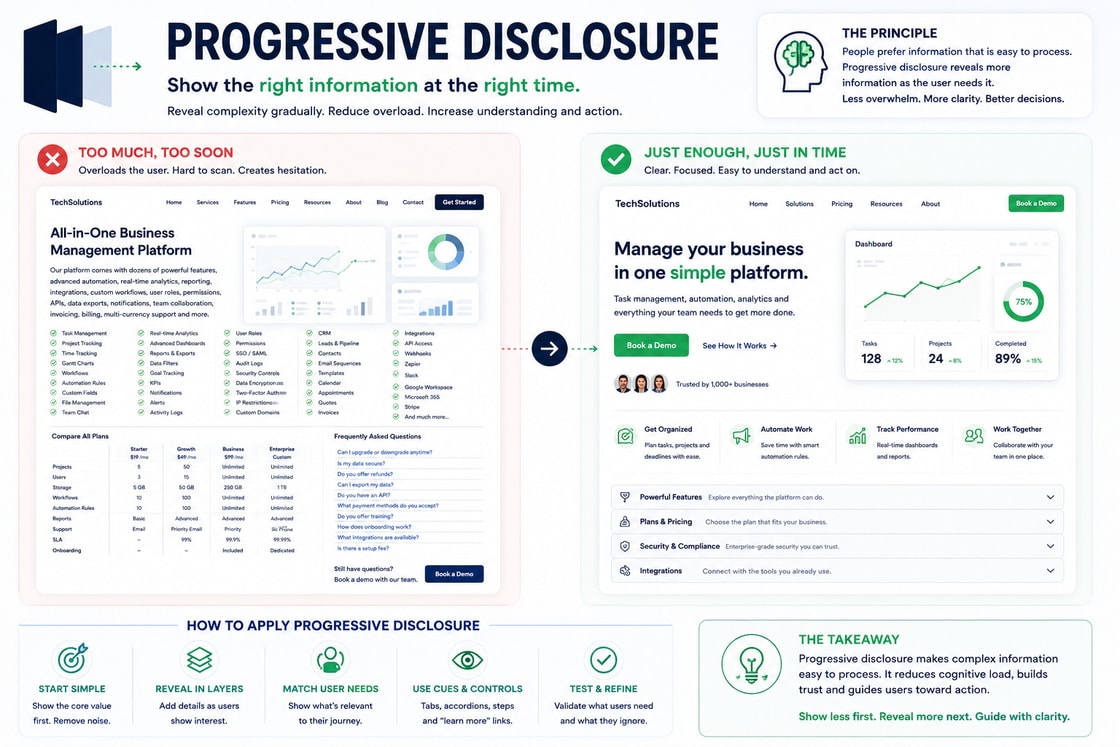
Progressive Disclosure is one of the most useful principles in behavioural web design. It explains how complex information can be revealed gradually so users are not overwhelmed at the beginning of a decision journey.
In simple terms, Progressive Disclosure means showing users what they need first, then revealing more detail only when it becomes useful.
This matters because most users do not arrive on a website ready to study everything. They scan quickly, judge relevance, look for the next step, and avoid unnecessary effort. If a page shows too much information too soon, users may feel overloaded before they understand the value of the offer.
A strong website does not hide important information. It organises information in a sequence that matches how people naturally make decisions.
Progressive Disclosure helps turn complexity into clarity. It allows a website to explain enough to create confidence, while keeping deeper details available for users who need them.
What Progressive Disclosure means
Progressive Disclosure is a design principle where information, options, or actions are introduced in stages instead of being shown all at once.
The goal is to reduce cognitive load. Users should not have to process every feature, every condition, every setting, every form field, or every technical detail at the start.
Instead, the interface should reveal the right information at the right moment.
For example:
A short service summary appears first, with detailed scope available lower on the page.
A pricing card shows the main difference between plans, with full feature details available in an expandable section.
A form starts with simple contact details, then asks for project requirements later.
A product page shows core benefits first, with technical specifications available under a separate tab.
A dashboard shows the most important metrics first, with advanced filters available when needed.
Progressive Disclosure is not about removing information. It is about controlling when information appears.
Good disclosure makes a page feel simpler without making it less useful.
Business Psychology Principle
From a business psychology point of view, Progressive Disclosure is about reducing decision pressure.
Every user has a limited attention budget. If the website spends that budget on too many details too early, the user may not have enough mental energy left to understand the offer, compare options, or take action.
This is especially important for businesses that sell complex services, technical products, software, consulting, training, financial services, healthcare, or high value ecommerce products.
The more complex the offer, the more important the sequence becomes.
Users need to build confidence in stages.
First, they need to understand what the offer is.
Then, they need to understand whether it applies to them.
Then, they need to trust the business.
Then, they need to compare the details.
Then, they need to know what happens after taking action.
Progressive Disclosure supports this journey by preventing the website from asking too much too soon.
A page that reveals information gradually can feel calm, professional, and easier to trust. A page that shows everything at once can feel difficult, even when the offer is strong.
In business psychology, this principle supports three major outcomes.
Lower cognitive load.
Higher decision confidence.
Better conversion readiness.
When users feel that the website is easy to move through, the business behind it feels easier to work with.
Why Progressive Disclosure matters on a website
A website has a small window to make the next step feel clear. If users are immediately faced with dense copy, too many options, long forms, technical details, pricing conditions, popups, and competing calls to action, they may hesitate before they understand the value.
Progressive Disclosure matters because it protects the user from unnecessary complexity.
It helps answer questions in the right order.
What is this?
Is it relevant to me?
Why should I care?
Can I trust it?
What are the details?
What should I do next?
What happens after I act?
If a page answers question five before question one, the user may feel lost. If a page asks for commitment before building trust, the action may feel premature. If a form asks for detailed information before the user understands the benefit, it may feel demanding.
Progressive Disclosure makes the website feel more natural because it respects the user’s mental pace.
How Progressive Disclosure shapes attention
Attention works best when users are given a clear starting point.
A page that reveals everything at once gives the user too many things to process. A page that reveals information in stages guides attention more effectively.
For example, a landing page should not begin with every feature, every testimonial, every pricing condition, every frequently asked question, and every form field. It should begin with the main promise.
A strong sequence might look like this:
Main value proposition.
Short explanation.
Primary benefit.
First proof signal.
Process summary.
Deeper service details.
Pricing or scope.
Frequently asked questions.
Call to action.
This order allows the user to understand one layer before moving to the next.
The aim is not to make the page shorter. The aim is to make the page easier to process.
How Progressive Disclosure builds trust
Trust is built when the user feels that the business is clear, honest, and easy to understand.
Progressive Disclosure can build trust because it prevents the page from feeling overwhelming. It shows that the business understands what information matters at each stage of the decision.
However, this principle must be used carefully. If important information is hidden too deeply, users may feel misled. If pricing limits, terms, cancellation details, or product restrictions are hard to find, the website may lose trust.
Good Progressive Disclosure does not hide risk. It organises detail.
For example:
Show the main pricing structure first.
Place important limits near the pricing section.
Use expandable details for deeper feature comparisons.
Place cancellation or support reassurance near the decision point.
Keep essential terms easy to access.
This allows the page to feel simple while remaining transparent.
How Progressive Disclosure improves usability
Usability improves when users are not forced to understand everything at once.
This is why Progressive Disclosure is common in:
Forms.
Checkout flows.
Onboarding.
Pricing pages.
Product pages.
Dashboards.
Settings pages.
Service pages.
Frequently asked questions.
Navigation menus.
A user filling out a form does not need to see every possible question immediately. A user comparing products does not need every technical detail before seeing the main difference. A user reviewing software does not need every advanced setting on the first screen.
Good usability is about giving users the right amount of information at the right time.
If the user wants more detail, they should be able to access it easily. If they do not need it yet, the interface should not force it into their path.
How Progressive Disclosure affects conversion
Conversion depends on confidence. Users are more likely to act when the decision feels understandable and manageable.
Progressive Disclosure helps conversion by reducing hesitation at key moments.
For example, a quote form can feel heavy if all fields are visible at once. The same form can feel easier if it is divided into steps.
Step 1: Basic details.
Step 2: Project requirements.
Step 3: Budget and timeline.
Step 4: Review and submit.
This does not reduce the amount of information needed, but it reduces the visible burden.
The same applies to pricing. A pricing page that shows every detail immediately can feel complex. A pricing page that first explains the main difference between plans, then allows users to compare deeper details, feels easier.
The same applies to product pages. A product page that begins with benefits, price, reviews, and purchase reassurance can convert better than one that opens with dense specifications.
The key is simple: users should feel ready for each next layer.
Progressive Disclosure and forms
Forms are one of the strongest places to use Progressive Disclosure.
A long form can create resistance before the user even starts. When the user sees too many fields at once, they may assume the process will take too long or require too much effort.
A progressive form reduces this feeling by showing fields in logical stages.
A strong structure might be:
Your contact details.
What you need help with.
Project details.
Preferred contact method.
Final confirmation.
This helps the user feel progress.
Progressive form design can also use conditional fields.
For example, if a user selects “Website redesign,” the form can reveal questions about current website URL, goals, and timeline. If the user selects “SEO audit,” the form can reveal different questions.
This keeps the form relevant and avoids asking unnecessary questions.
Good progressive forms should include:
Clear step labels.
Progress indicators.
Short explanations.
Easy back navigation.
Visible error messages.
A clear final review.
Reassurance near submission.
The form should feel guided, not fragmented.
Progressive Disclosure and pricing pages
Pricing pages often contain a lot of information. Plans, features, limits, billing terms, add ons, support levels, usage caps, guarantees, and frequently asked questions can become difficult to compare.
Progressive Disclosure helps by presenting pricing in layers.
First layer:
Plan name.
Best fit.
Price.
Main benefits.
Primary call to action.
Second layer:
Feature comparison.
Usage limits.
Support details.
Add ons.
Third layer:
Billing terms.
Cancellation policy.
Frequently asked questions.
Custom requirements.
This structure lets users understand the broad choice first, then inspect the details if needed.
The mistake is either showing too much detail too early or hiding details that users need before buying. The right balance depends on the complexity of the offer.
Progressive Disclosure and ecommerce
Ecommerce pages benefit from Progressive Disclosure because users need to make buying decisions quickly, but they also need access to detail.
A product page should not overload the first view with every specification. The first view should help users understand the product and feel safe enough to continue.
A strong product page might reveal information like this:
Product name.
Main image.
Price.
Main benefit.
Reviews.
Delivery reassurance.
Purchase button.
Product details.
Specifications.
Returns and warranty.
Frequently asked questions.
Technical details can be placed in tabs or expandable sections, but delivery, returns, and trust information should remain easy to find.
This keeps the buying path clear while supporting users who need deeper information.
Progressive Disclosure and SaaS onboarding
SaaS products often fail when they expose too much too soon. New users do not need every feature immediately. They need to reach the first useful outcome quickly.
Progressive Disclosure supports onboarding by introducing features in stages.
For example:
Welcome and goal selection.
Basic setup.
First key action.
Suggested next step.
Advanced features later.
This helps users avoid feeling lost inside the product.
The best onboarding does not teach everything. It helps users achieve the first meaningful result.
Once users understand the core value, they are more willing to explore deeper features.
Progressive Disclosure and navigation
Large websites often have too many pages to show clearly in a simple navigation bar. Progressive Disclosure can help through grouped menus, mega menus, expandable categories, and search.
The goal is to show broad categories first, then reveal deeper options when users choose a direction.
For example:
Services.
Industries.
Case Studies.
Resources.
Contact.
Inside Services, the menu can reveal subcategories. Inside Resources, it can reveal blogs, guides, reports, and webinars.
This prevents the main navigation from becoming overloaded while keeping deeper pages accessible.
Navigation should feel like a guided map, not a storage drawer.
How to Apply Progressive Disclosure
1. Start with the essential message
The first view should answer the most important question.
What is this page about?
Do not start with every detail. Start with the main value.
2. Reveal detail in logical layers
Think of the page as a sequence.
First, show the user what matters most. Then reveal supporting details. Then provide proof. Then handle objections. Then guide the user towards action.
3. Use expandable sections carefully
Accordions, tabs, dropdowns, and “read more” sections can be useful. They help keep the page clean.
Use them for:
Frequently asked questions.
Technical specifications.
Detailed feature comparisons.
Long policy explanations.
Advanced settings.
Avoid hiding information that users need before making a decision.
4. Break complex forms into steps
If a form has many fields, divide it into stages. Each stage should feel manageable and logical.
Keep progress visible so users know how much is left.
5. Use conditional logic
Only show questions or options that apply to the user’s previous choice.
For example, if a user selects “monthly plan,” show monthly billing details. If they select “annual plan,” show annual billing details.
This reduces irrelevant information.
6. Keep deeper details accessible
Progressive Disclosure should not make users hunt for information. Advanced details should be easy to open, scan, and close.
The user should feel in control.
7. Place reassurance at decision points
When users move from one stage to another, reassurance helps.
For example:
“No payment required.”
“Takes less than two minutes.”
“You can review before submitting.”
“Cancel anytime.”
“We will never share your details.”
These small cues reduce hesitation.
Tips and Tricks
Use a simple first screen
The opening screen should not carry the full burden of the page. It should create enough clarity for users to continue.
Use summaries before details
Before showing a long comparison or technical explanation, provide a short summary.
A summary helps users understand what they are about to review.
Add “learn more” paths
Some users want quick answers. Others want deeper detail. Give both groups a path.
Use “Learn more,” “View details,” “Compare features,” or “See full specifications” where useful.
Keep the main action visible
Even when details are hidden or expanded, the main action should remain easy to find.
Do not hide pricing too deeply
Pricing can be simplified, but it should not be buried. If users expect pricing and cannot find it, trust may drop.
Use progressive steps in long content
Long articles, service pages, and landing pages should reveal detail through headings, subheadings, summaries, examples, and frequently asked questions.
Use defaults for common needs
A default view can show the most common information first, with options to expand.
For example, a pricing page may show the monthly view first with a toggle for annual pricing.
Test hidden content
If users rarely open an accordion that contains important information, the content may be hidden too deeply.
Use analytics, heatmaps, or user testing to see whether important details are being missed.
Practical examples
Service page
A service page can use Progressive Disclosure by introducing the offer in stages.
A strong structure:
What the service does.
Who it is for.
What outcomes it creates.
What is included.
How the process works.
Proof and case studies.
Frequently asked questions.
Call to action.
This prevents the service from feeling too complex at the start.
Landing page
A landing page should reveal information in a persuasive sequence.
Start with the core promise. Then show the problem. Then show the solution. Then show proof. Then explain the process. Then handle objections. Then invite action.
This matches how users build confidence.
Quote form
A quote form should not ask for every detail on the first screen.
A better flow:
What do you need?
When do you need it?
What is your budget range?
How can we contact you?
Review your request.
This feels easier than one long list of fields.
Product page
A product page should show buying essentials first, then deeper details.
First view:
Product image.
Product name.
Price.
Main benefit.
Reviews.
Delivery and return reassurance.
Buy button.
Further down:
Specifications.
Materials.
Warranty.
Care instructions.
Frequently asked questions.
This allows users to act quickly or investigate further.
Dashboard
A dashboard should show the most important information first.
For example:
Main performance metric.
Recent change.
Recommended action.
Filters.
Detailed reports.
Advanced settings.
The user should not be dropped into a dense control panel without guidance.
Common mistakes
Hiding essential information
Progressive Disclosure should not hide important details. Pricing, risks, limits, delivery information, cancellation terms, and privacy details should remain easy to access.
Revealing information in the wrong order
If users need context before detail, give context first. If users need proof before action, give proof first.
Order matters.
Making users click too much
Disclosure should reduce effort, not add unnecessary steps. If users must constantly open sections to understand the page, the design may be too hidden.
Using accordions for everything
Accordions are useful, but overusing them can make the page feel fragmented. Essential content should still be visible.
Breaking the mobile experience
Progressive layouts can fail on mobile if expandable sections, tabs, or multi step forms are not easy to use.
Mobile users need especially clear sequencing.
Removing useful detail
Simplification should not weaken the page. Users still need enough information to make an informed decision.
The goal is better sequencing, not shallow content.
How to use Progressive Disclosure ethically
Progressive Disclosure should help users make better decisions. It should not be used to hide costs, risks, limitations, or important terms.
Good use of Progressive Disclosure:
Reduces overload.
Improves clarity.
Makes complex information manageable.
Gives users control.
Keeps important details accessible.
Supports informed decisions.
Bad use of Progressive Disclosure:
Hides fees.
Buries cancellation terms.
Makes limits hard to find.
Forces users through unnecessary steps.
Uses simplicity to disguise risk.
Ethical design makes the journey easier without reducing transparency.
How to audit a website using Progressive Disclosure
A Progressive Disclosure audit helps identify where the page reveals too much, too little, or the wrong information at the wrong time.
Ask these questions:
What does the user need to understand first?
Is the first screen overloaded?
Are details revealed in a logical order?
Is important information too hidden?
Are forms broken into manageable steps?
Are advanced details available without cluttering the main path?
Are pricing and terms easy to find?
Do accordions or tabs hide essential information?
Does the mobile experience preserve the same logic?
Does the page guide users from basic understanding to deeper confidence?
Can users move forward without feeling overwhelmed?
Can detailed users still find what they need?
If the page feels heavy, it may need better disclosure. If the page feels vague, it may be hiding too much.
Practical takeaway
Progressive Disclosure shows that clarity is not created by showing less information. It is created by showing information in the right order.
Users need enough detail to trust the page, but not so much detail that they feel overwhelmed before they understand the offer.
A strong website reveals complexity gradually.
First, it creates clarity.
Then, it builds relevance.
Then, it provides proof.
Then, it explains details.
Then, it guides action.
The best websites do not make users process everything at once. They help users move through decisions one layer at a time.
Before publishing an important page, ask three questions:
What does the user need right now?
What can wait until later?
What must stay visible for trust?
If the answer is unclear, the page may not need more content. It may need better sequencing.
Design checklist
Show the most important message first.
Reveal deeper details gradually.
Keep essential information easy to access.
Use summaries before long explanations.
Break complex forms into steps.
Use conditional logic to avoid irrelevant questions.
Use accordions for secondary details, not critical information.
Keep pricing and terms visible enough to build trust.
Make progress visible in multi step flows.
Place reassurance near stage changes and final actions.
Keep the main call to action easy to find.
Test whether users can find hidden details.
Make mobile disclosure simple and tap friendly.
Avoid making users click too much.
Use Progressive Disclosure to reduce overload without reducing transparency.
Processing Fluency is one of the most useful psychology principles in behavioural web design. It explains why people tend to prefer things that are easier to understand, easier to read, easier to recognise, and easier to act on.
In simple terms, when something feels easy to process, people are more likely to trust it, like it, remember it, and move forward with it.
On a website, this matters immediately. Users do not judge a page only by what it says. They judge how easy the page feels to understand. A page with clear headings, readable copy, familiar patterns, strong contrast, simple navigation, and obvious next steps feels safer than a page that forces the user to work.
A business may have a strong offer, but if the website feels difficult to process, users may hesitate before they understand the value.
Processing Fluency helps explain why clarity often beats cleverness. A simple message can outperform a complex one. A clean layout can feel more trustworthy than a crowded one. A familiar interaction can convert better than an unusual one. A readable page can make the business behind it feel more professional.
The strongest websites do not only look attractive. They feel easy to understand.
What Processing Fluency means
Processing Fluency refers to the ease with which the brain can take in, understand, and interpret information.
When something is fluent, it feels smooth. The user does not need to stop, decode, question, or mentally reorganise the page. The message, layout, and action feel obvious.
When something is not fluent, the user feels resistance. The page may still be visually impressive, but it requires more mental effort. Users may struggle to understand what the business does, what the offer means, where to click, or why they should trust the page.
In web design, Processing Fluency is affected by many things.
Clear typography.
Strong visual hierarchy.
Simple language.
Predictable layouts.
Familiar navigation.
Consistent buttons.
Good spacing.
Strong contrast.
Relevant imagery.
Clear calls to action.
Logical content order.
Fast loading speed.
Mobile readability.
Low visual clutter.
Easy comparison.
When these elements work together, the page feels easier to process. That ease can increase trust, attention, and confidence.
Business Psychology Principle
From a business psychology point of view, Processing Fluency is about reducing mental effort so users can focus on the value of the offer.
People often judge a business through the experience of using its website. If the site feels clean, clear, and easy, the business feels more competent. If the site feels confusing, cluttered, or hard to read, the business can feel less reliable, even if the actual service is good.
This is important because users rarely separate the offer from the interface.
A difficult website can make the offer feel difficult.
A confusing page can make the business feel confusing.
A cluttered design can make the service feel less professional.
A clear website can make the business feel more trustworthy.
Processing Fluency supports business outcomes in four major ways.
It helps users understand the offer faster.
It reduces hesitation.
It increases perceived credibility.
It makes the next action feel easier.
In commercial terms, fluency lowers resistance. It helps users move from attention to understanding, from understanding to trust, and from trust to action.
This does not mean every website should be plain. It means every creative decision should make the experience easier, not harder.
Why Processing Fluency matters on a website
A website has only a short window to prove that it is worth the user’s attention. Most visitors are not patient. They do not want to decode vague headlines, crowded sections, hidden buttons, complicated menus, or unclear pricing.
They want to understand quickly.
Processing Fluency matters because users often equate ease with quality. If a page is easy to read and navigate, it feels more professional. If it feels hard to understand, users may assume the business is harder to work with.
This is especially important for:
Service businesses.
SaaS companies.
Ecommerce websites.
Agencies.
Consultants.
Financial services.
Healthcare websites.
Education providers.
Legal and professional services.
High ticket products.
In these categories, users need confidence before taking action. A fluent website reduces uncertainty.
The user should not have to fight the design to understand the business.
How Processing Fluency shapes attention
Users pay more attention to things that are easier to process. If a page has too many competing elements, attention becomes scattered. If the page has clear hierarchy, users know what to notice first.
A fluent page guides attention in a natural order.
Main headline.
Supporting explanation.
Relevant visual.
Trust signal.
Primary call to action.
Next section.
This order helps the user understand the page without confusion.
Poor fluency often happens when every element competes for attention. Large headings, bright badges, multiple buttons, animations, popups, icons, and dense copy can all fight for the same mental space.
The result is not more attention. The result is more effort.
A fluent design makes the most important thing obvious.
How Processing Fluency builds trust
Trust is not built only through testimonials, reviews, awards, or logos. Trust also comes from how easy the experience feels.
A clear website suggests that the business is organised.
A readable page suggests that the business respects the user’s time.
A simple form suggests that the business has thought about the process.
A clean pricing section suggests that the business is transparent.
A consistent design system suggests that the business is stable.
Processing Fluency creates trust because users feel less uncertainty. They do not have to wonder what the page means, where to click, or whether they are missing something important.
This is why clarity is not basic. Clarity is persuasive.
A page that is easy to process often feels more credible than a page that tries too hard to impress.
How Processing Fluency affects conversion
Conversion depends on confidence. Users are more likely to act when the page feels simple, clear, and low risk.
Before taking action, users usually need to understand:
What the offer is.
Why it matters.
Whether it applies to them.
Why the business is credible.
What happens after they click.
Whether the action is safe.
Processing Fluency helps by making each of these answers easier to find.
For example, a call to action works better when the surrounding content is clear. A form feels easier when the fields are simple and grouped logically. A pricing table converts better when the options are easy to compare. A product page performs better when benefits, images, reviews, delivery, and returns are easy to understand.
The user should not feel that conversion requires effort.
The best conversion paths feel obvious, calm, and natural.
Processing Fluency and visual design
Visual design has a direct impact on fluency. A page can contain strong content, but if the visual presentation is hard to read, users may not engage with it.
Important visual fluency factors include:
Font size.
Line height.
Contrast.
Spacing.
Alignment.
Section rhythm.
Button visibility.
Image relevance.
Content grouping.
Visual hierarchy.
A visually fluent page does not mean an empty page. It means the page has enough structure for users to understand what matters.
Good design reduces interpretation.
Bad design increases interpretation.
If the user has to ask, “Where should I look?” the design is not fluent enough.
Processing Fluency and copywriting
Copywriting has a major role in Processing Fluency. Users should not have to translate the message into plain meaning.
A fluent copy style is:
Clear.
Specific.
Direct.
Useful.
Easy to scan.
Free from unnecessary jargon.
Focused on user value.
Weak copy often sounds impressive but says very little.
For example, this is low fluency:
“Empowering scalable digital transformation through innovative strategic solutions.”
This is higher fluency:
“We help growing businesses turn more website visitors into qualified leads.”
The second line is easier to understand. It tells the user what the business does and why it matters.
In web design, simple language is not less intelligent. It is more useful.
Processing Fluency and navigation
Navigation should make the website feel predictable. Users should be able to understand the site structure quickly.
A fluent navigation system uses clear labels.
Examples:
Services.
Case Studies.
Pricing.
Resources.
About.
Contact.
Unclear labels create friction.
Examples:
Explore.
Experience.
Solutions Hub.
Growth Engine.
Discover More.
These labels may sound creative, but they can slow users down if the meaning is not obvious.
Navigation is not the best place to be vague. It should help users move with confidence.
Processing Fluency and forms
Forms are one of the most important places to apply Processing Fluency. A form is a moment of commitment. If it feels difficult, users may abandon it.
A fluent form should have:
Clear labels.
Logical field order.
Simple field groups.
Short help text.
Visible required fields.
Helpful error messages.
Reassurance near the submit button.
A clear success message.
Minimal unnecessary fields.
Strong mobile usability.
The form should feel easy before the user starts. If the first impression of the form feels heavy, the user may not even begin.
For longer forms, divide the process into steps.
For example:
Your details.
Your requirements.
Preferred contact method.
Review and submit.
This makes the form feel more manageable.
Processing Fluency and pricing
Pricing is naturally sensitive because users are comparing cost, value, risk, and fit. If pricing is hard to understand, users hesitate.
A fluent pricing section should make comparison easy.
It should clearly show:
Plan name.
Best fit.
Price.
Core benefits.
Main differences.
Limits.
Reassurance.
Call to action.
The user should not need to study every detail before understanding the basic choice.
For example, pricing can be made easier with labels such as:
Best for starters.
Best for growing teams.
Best for larger teams.
Best for custom needs.
These labels reduce mental effort and help users compare options faster.
Processing Fluency and mobile design
Mobile design makes Processing Fluency even more important. On smaller screens, users have less visible context and less patience for clutter.
A fluent mobile page should:
Lead with a clear headline.
Keep paragraphs short.
Make buttons easy to tap.
Avoid oversized visuals that hide the message.
Keep forms simple.
Preserve logical reading order.
Keep navigation easy.
Avoid intrusive popups.
Use enough spacing.
Keep important proof visible.
A desktop layout cannot simply be squeezed into mobile. It must be reorganised so the user can process the page vertically.
If the mobile version feels harder than the desktop version, conversion will suffer.
How to Apply Processing Fluency
1. Make the main message instantly clear
The first screen should explain the offer quickly. Users should not have to scroll or guess to understand what the business does.
A good first screen answers:
What is this?
Who is it for?
Why does it matter?
What should I do next?
2. Use simple and specific language
Avoid vague claims. Say what the business does in direct terms.
Instead of:
“We deliver next generation growth solutions.”
Use:
“We help B2B companies generate more qualified leads from organic search.”
Specific copy is easier to process.
3. Reduce visual clutter
Remove elements that do not support the page goal. Every icon, image, badge, button, and animation should earn its place.
Clutter weakens fluency because it forces users to decide what matters.
4. Create a clear hierarchy
Make the most important message visually strongest. Supporting details should feel secondary. Buttons should be easy to identify. Sections should have a clear rhythm.
Users should be able to scan the page and understand the structure.
5. Group related content
Related content should sit together. Unrelated content should be clearly separated.
This applies to:
Features.
Benefits.
Testimonials.
Pricing.
Form fields.
Navigation items.
Product details.
Grouping reduces mental effort.
6. Use familiar patterns
Users already understand common website patterns. Use that familiarity.
For example:
Logo links to homepage.
Main navigation sits near the top.
Primary button stands out.
Form labels sit close to fields.
Reviews support trust.
Pricing plans are easy to compare.
Creative design is useful only when it does not make the user relearn basic behaviour.
7. Make the next step obvious
Every key section should guide the user towards a natural next step.
Examples:
Learn more.
Book a call.
Compare plans.
Request a quote.
Start free.
Download the guide.
The action should match the user’s level of readiness.
8. Improve readability
Readability is central to Processing Fluency.
Use:
Clear font sizes.
Comfortable line height.
Short paragraphs.
Strong contrast.
Descriptive headings.
Simple sentence structure.
Enough spacing.
If users struggle to read the page, they will struggle to trust it.
Tips and Tricks
Use the five second test
Show the page to someone for five seconds and ask:
What does this business do?
Who is it for?
What would you click next?
If they cannot answer, the page is not fluent enough.
Read the page out loud
If the copy sounds complicated when spoken, it will probably feel complicated on the page.
Strong website copy often sounds natural.
Replace clever labels with clear labels
Use labels users instantly understand. Clarity should come before creativity, especially in navigation, forms, pricing, and buttons.
Use one main action per section
Do not make users choose between too many equal actions. One clear primary action is usually stronger than several competing buttons.
Make proof easy to understand
Do not hide proof in long paragraphs. Use short result statements, clear testimonials, logos, or numbers where appropriate.
For example:
Trusted by 1,000 businesses.
Increased leads by 120 percent.
Rated 4.9 by customers.
Used by teams in 20 countries.
Proof should be easy to scan.
Keep sections visually consistent
Consistent section patterns improve fluency. Users should not feel that every section is a new interface.
Use whitespace with purpose
Whitespace should not only make the page look premium. It should help users understand which elements belong together.
Avoid unnecessary animation
Animation can help guide attention, but too much motion makes the page harder to process.
Use animation only when it supports understanding.
Simplify before adding
When a page underperforms, the answer is not always more content. Sometimes the answer is less friction.
Before adding new sections, ask what can be made clearer.
Practical examples
Hero section
A fluent hero section should quickly explain the business and the next step.
Strong structure:
Clear headline.
Short supporting copy.
Primary call to action.
Trust signal.
Relevant visual.
Weak structure:
Vague slogan.
Long paragraph.
Multiple buttons.
Decorative image.
No proof.
The first version is easier to process. The second version asks the user to work.
Service page
A service page should turn a complex offer into a clear journey.
Useful order:
Problem.
Outcome.
What the service includes.
How the process works.
Proof.
Frequently asked questions.
Call to action.
This structure helps the user understand the service without feeling overwhelmed.
Product page
A product page should make the buying decision easy to evaluate.
Important elements should be clear:
Product name.
Product image.
Price.
Main benefit.
Reviews.
Delivery information.
Return policy.
Purchase button.
If users have to search for basic buying information, fluency is weak.
Pricing page
A pricing page should reduce comparison effort.
Use:
Clear plan names.
Best fit labels.
Short benefit summaries.
Highlighted differences.
Transparent limits.
Reassurance near action.
Users should understand the main difference between plans before reading every feature.
Form page
A fluent form should feel easy and safe.
Use:
Short field labels.
Logical field order.
Help text near difficult fields.
Progress indicators for longer forms.
Privacy reassurance.
Clear submit button.
Helpful success message.
The goal is to reduce hesitation before it happens.
Common mistakes
Making the design visually impressive but hard to understand
A website can look beautiful and still fail if users cannot quickly understand the message.
Visual polish should support fluency, not replace it.
Using vague copy
Generic language makes users work harder.
Avoid phrases such as:
Innovative solutions.
Transform your business.
Unlock your potential.
Future ready growth.
These lines can sound polished but often fail to explain the offer.
Overloading the first screen
The first screen should create clarity. Too many buttons, badges, visuals, and claims create friction.
Hiding important information
Simplicity should not mean hiding details users need. Pricing, terms, delivery, process, and risk information should be easy to find.
Using poor contrast
Low contrast text may look elegant, but it reduces readability. If users struggle to read, they struggle to trust.
Making every section look different
Too much layout variation makes the website feel harder to process. Consistency helps users move with confidence.
Ignoring mobile readability
Small text, tight spacing, large images, and intrusive popups can destroy fluency on mobile.
How to use Processing Fluency ethically
Processing Fluency should be used to make decisions easier and clearer, not to hide information or rush users into choices.
Good use of Processing Fluency:
Makes information easier to understand.
Improves readability.
Reduces unnecessary effort.
Clarifies choices.
Helps users compare options.
Explains what happens next.
Supports informed decisions.
Bad use of Processing Fluency:
Hides important terms.
Makes risky choices look too simple.
Removes useful comparison details.
Pushes users without enough context.
Uses clarity to disguise weak offers.
Ethical design makes the user feel informed, not trapped.
How to audit a website using Processing Fluency
A Processing Fluency audit helps identify where the website feels harder than it needs to be.
Ask these questions page by page:
Can users understand the offer within five seconds?
Is the headline clear and specific?
Is the visual hierarchy obvious?
Is the copy easy to scan?
Are buttons easy to recognise?
Is the navigation predictable?
Are related elements grouped together?
Is pricing easy to compare?
Are forms simple and logical?
Is proof easy to find and understand?
Does the mobile version feel smooth?
Are there any unnecessary distractions?
Does every section have a clear purpose?
Is the next step obvious?
Does the page feel easier after each scroll?
If the page feels mentally heavy, Processing Fluency is weak.
Practical takeaway
Processing Fluency shows that users prefer websites that feel easy to understand. A fluent website reduces mental effort, builds trust, improves usability, and makes action feel more natural.
The goal is not to make the website basic. The goal is to make the experience clear.
Clear words.
Clear structure.
Clear hierarchy.
Clear proof.
Clear action.
When a page is easy to process, users are more likely to stay, trust, compare, and convert.
Before publishing an important page, ask three questions:
What does the user need to understand first?
What is making that harder than necessary?
How can the page make the next step feel easier?
If the answer is unclear, the website may not need more design. It may need better fluency.
Design checklist
Make the main message clear within five seconds.
Use simple and specific language.
Keep typography readable.
Use strong contrast.
Create a clear visual hierarchy.
Remove unnecessary clutter.
Group related content together.
Make the primary call to action obvious.
Keep navigation predictable.
Use familiar design patterns.
Make pricing easy to compare.
Keep forms simple and logical.
Place reassurance near high friction actions.
Check mobile readability carefully.
Make every section easier to process than the last.
Progressive Disclosure is not just a psychology term. In behavioural web design, it becomes a practical lens for deciding what users notice, how they interpret a page, and whether they feel confident enough to continue. The strongest websites do not rely on visual polish alone. They use structure, sequencing, contrast, and context to make decision making feel natural.
What the principle means
At its core, progressive disclosure explains why people do not read and judge a page as a neutral machine would. They scan for patterns, compare what is near, familiar, prominent, or easy, and then decide whether the page deserves more attention. In web design, the principle matters because the interface is often judged before the offer is fully understood.
Why it matters on a website
A website has only a small window to make the next action feel clear. When progressive disclosure is respected, the page feels more coherent, less mentally expensive, and more trustworthy. When it is ignored, users may hesitate, miss the intended path, or assume the page is harder to use than it really is.
How to apply it
Use the principle to guide layout, hierarchy, copy order, button placement, form design, product comparison, and the rhythm of the page. The aim is not to manipulate the user. The aim is to remove unnecessary friction so the intended decision becomes easier to understand.
Common mistake
The common mistake is treating the principle as decoration rather than structure. A page can look polished and still create confusion if the visual relationships, content sequence, or decision cues are weak. Good behavioural design makes the correct next step feel obvious without making the page feel forced.
Practical takeaway
Before publishing a page, ask what the user will notice first, what they will compare next, and what confidence they need before taking action. If the answer is unclear, the design is asking the visitor to do too much cognitive work.
Design checklist
Make the first visible cue support the main purpose of the page.
Keep related content, proof, and calls to action close enough to feel connected.
Remove choices that compete with the user’s most likely next decision.
Use spacing, order, and contrast to reduce unnecessary interpretation.
Test the page by asking whether a new visitor can explain the next step in five seconds.